Contents
Git 基础概念
- 版本控制系统:记录文件变化,允许回退到任意历史版本
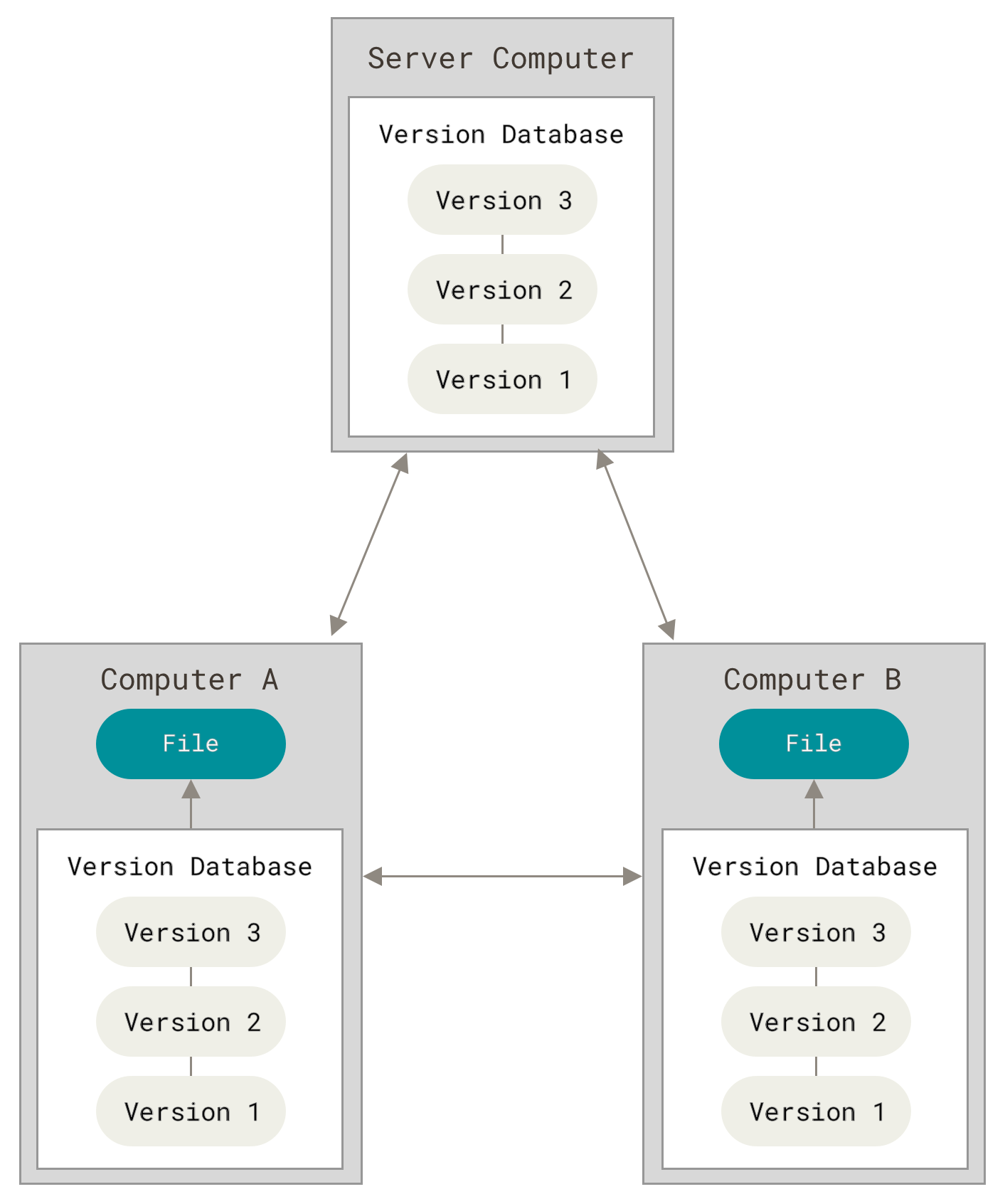
- 分布式 vs 集中式:
- SVN等属于集中式版本控制:使用一个单一的集中管理的服务器,保存所有文件的修订版本,而协同工作的人们都通过客户端连到这台服务器,取出最新的文件或者提交更新。
- Git是分布式版本控制:客户端并不只提取最新版本的文件快照, 而是把代码仓库完整地镜像下来,包括完整的历史记录。 这么一来,任何一处协同工作用的服务器发生故障,事后都可以用任何一个镜像出来的本地仓库恢复。 因为每一次的克隆操作,实际上都是一次对代码仓库的完整备份。
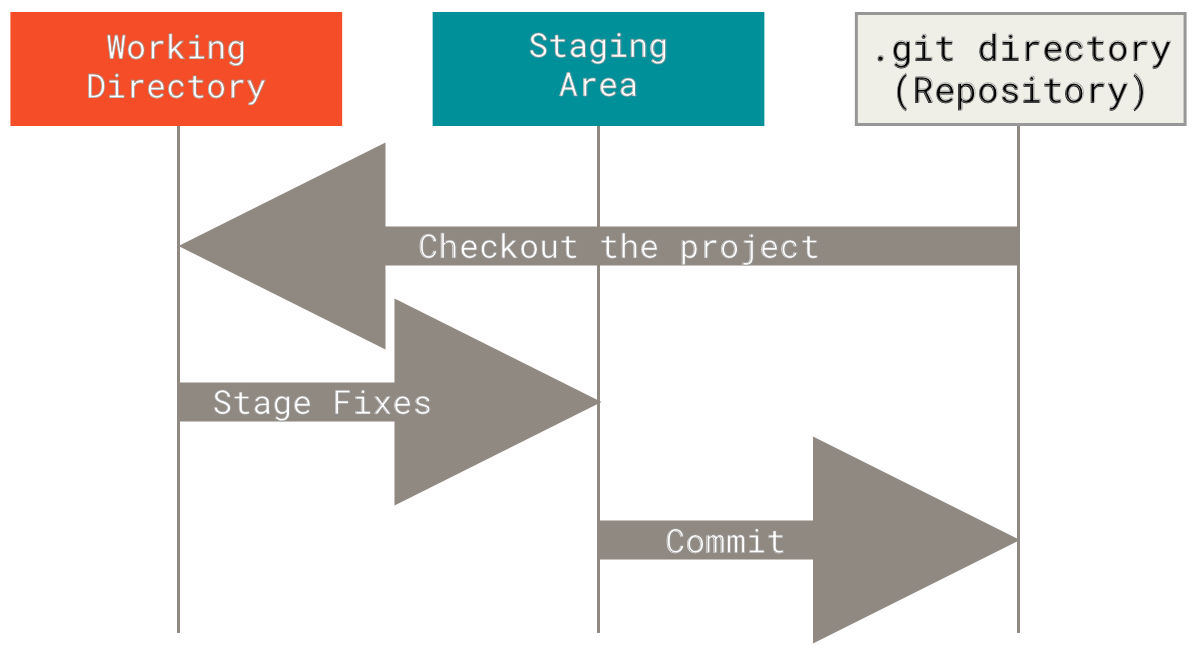
- 三个重要区域:
- 工作目录(Working Directory):对项目的某个版本独立提取出来的内容。 这些从 Git 仓库的压缩数据库中提取出来的文件,放在磁盘上供你使用或修改。
- 暂存区(Staging Area):保存了下次将要提交的文件列表信息,一般在 Git 仓库目录中。 按照 Git 的术语叫做“索引”,不过一般说法还是叫“暂存区”。
- 仓库(Repository):Git 用来保存项目的元数据和对象数据库的地方。 这是 Git 中最重要的部分,从其它计算机克隆仓库时,复制的就是这里的数据。
安装与配置
安装 Git
基础配置
在使用 Git 之前,首要任务是配置你的用户名(username)邮件地址(email address),之后使用 Git 的每一次提交都会使用这些信息
# 设置用户名和邮箱(全局)
git config --global user.name "Your Name"
git config --global user.email "your@email.com"

# 查看配置
git config --list
有时候克隆或者推送远程库时(GitHub)可能碰上请求超时的问题,需要配置或取消一下代理
# HTTP 代理
git config --global http.proxy <你的代理IP:端口>
# HTTPS 代理
git config --global https.proxy <你的代理IP:端口>

# 取消代理
git config --global --unset http.proxy
git config --global --unset https.proxy

# 针对当前终端会话临时取消
unset ALL_PROXY
unset HTTP_PROXY
unset HTTPS_PROX
基础操作
创建/克隆仓库
# 本地初始化新仓库
mkdir [git-repo-name] && cd [git-repo-name]
git init
# 等价于
git init [git-repo-name]

# 克隆现有仓库
git clone <repository_url>
文件状态管理
# 查看当前状态
git status
# 图形化显示全部分支的提交历史
git log --oneline --all --graph

# 添加文件到暂存区
git add <file>  # 添加单个文件
git add .       # 添加所有修改

# 提交更改
git commit -m "commit message"

# 从暂存区撤销
git restore --staged <file>
分支管理
# 查看分支
git branch       # 本地分支
git branch -a    # 所有分支(包括远程)

# 创建分支
git branch <branch_name>

# 切换(签出)分支
git checkout <branch_name>
# 或创建并切换:
git checkout -b <new_branch>

# 合并分支(需先切换到目标分支)
git merge <source_branch>

# 删除分支
git branch -d <branch_name>   # 安全删除(已合并)
git branch -D <branch_name>   # 强制删除(未合并)
远程操作
# 查看远程仓库
git remote -v

# 添加远程仓库
git remote add <remote_name> <repository_url>
# 从本地 Git 仓库删除远程仓库
git remote remove <name>
# 重命名远程仓库
git remote rename <old-name> <new-name>

# 推送分支到远程
git push <remote> <branch>
git push -u origin main      # -u设置默认上游分支

# 拉取远程更新(会合并)
git pull <remote> <branch>

# 获取远程更新(不自动合并)
git fetch <remote>
# 获取远程最新信息,并执行「修剪」操作,比如删除已经不存在的远程分支引用
git fetch -p
撤销与回退
git reset用于取消已经提交的变更、移动 HEAD 指针、重置暂存区和工作目录等操作,会直接修改/删除提交历史,通常适用于本地分支的修改撤销
# 撤销工作区修改(未add)
git restore <file>

# 撤销暂存区修改(已add)
git reset <file>

# 撤销提交(回退到指定commit)
git reset --soft <commit>   # 保留更改在暂存区
git reset --mixed <commit>  # 保留更改在工作区(默认)
git reset --hard <commit>   # 彻底丢弃更改

# 用例:撤销上一次提交,并保留更改在暂存区
git reset --soft HEAD~1
# 如果想删除远程仓库的提交记录,需要(慎重!):
git push --force

# 修改最后一次提交
git commit --amend -m "new message"
git revert 用于撤销某次提交的更改,但不会删除该提交历史,而是创建一个新的”反向提交”来抵消原提交的更改,通常适用于公共分支的修改撤销
git revert <commit>

# 同时撤销多个提交
git revert <commit1> <commit2> ...

git revert HEAD~1